

Open-source app hosting

Deploy apps
on your own server.

Ship your own code or install one of hundreds of ready-to-run apps. Manage domains, HTTPS, and deployments from one dashboard.

Live demo password: captain42

An active CapRover deployment showing its version, image and build logs control

300+ One-Click Apps

Browse One-Click Apps

Numerous deployment methods, endless opportunities.

Publish a static site

Serve plain HTML or ship your frontend build output.

Dockerfile
FROM nginx:alpine
COPY ./public/ /usr/share/nginx/html/
$ caprover deploy

Point your captain-definition file to ./Dockerfile before deploying.

Also deploy from Git, a prebuilt image, a tar archive, or your CI/CD pipeline.

Deployment guide
Operate your apps

Roll back an image
Pick a previous deployment while its image is still available. App settings and persistent data stay at their current versions.
Automatic HTTPS
Attach a domain and enable a Let’s Encrypt certificate. CapRover handles renewal.
See what’s running
Check running app instances, task history and server disk usage in the dashboard.
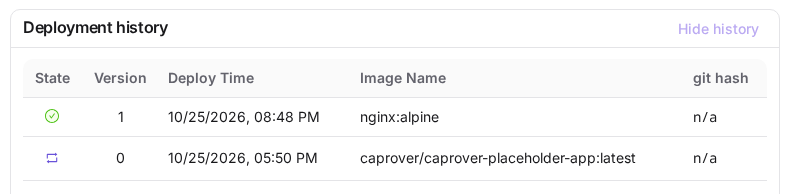
CapRover deployment history showing the current and previous versions of an app
Deployment history for an example app in the CapRover demo.

Advanced controls

Edit per-app NGINX
CapRover generates routing for each web app. Edit the full NGINX template when one app needs a larger upload limit, a response header or a different timeout.
Set Docker service options
Manage environment variables, volumes and replicas in the dashboard. Use a JSON or YAML Service Update Override to set options such as a memory limit or a read-only bind mount.
Add workers to the same Swarm
Set up a shared image registry, including one CapRover can provision, and republish existing builds. Add workers for stateless replicas. Local volumes stay on their node.

Deploy your first app on your VPS.

The installation guide covers server setup and the 1 GiB RAM minimum.

Support and release updates

Support CapRover

Donate to CapRover on OpenCollective