Play with CapRover
View-only Demo
If you only want to see the view-only demo, go to the home page and click on Live Demo
Working Demo
If you want to create a working instance of CapRover, you can use Play-with-Docker website. This is a website that allows you to create Virtual Servers in seconds and install Docker images on it. This is the best play ground for playing with CapRover.
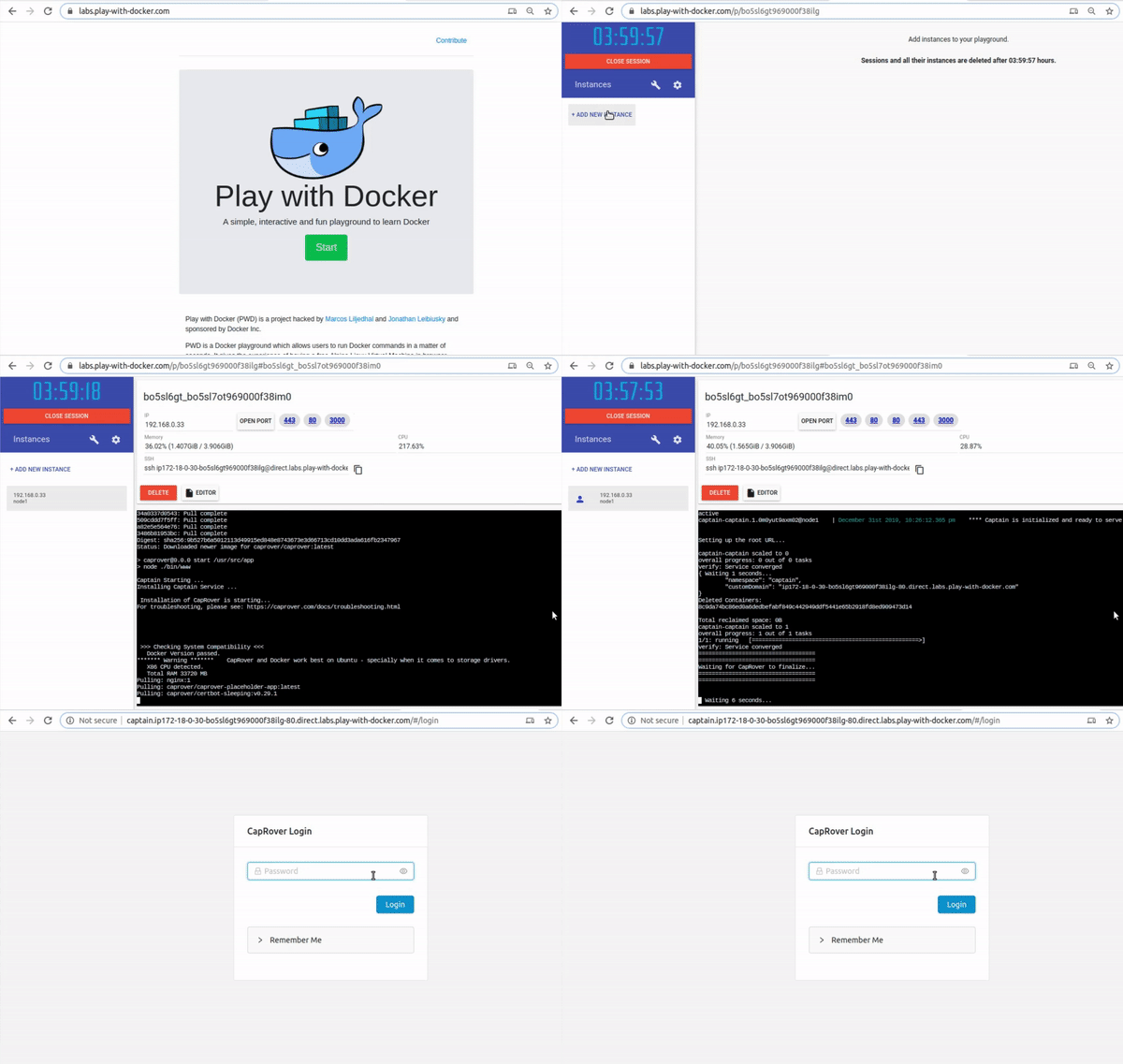
Follow these steps:
- Make sure you have an account on Docker Hub. If you don't, create one, it's 100% free.
- Go to play-with-docker.com
- Click on Start and log in using your Docker Hub username/password
- Once your session started you will see a page with a timer
- You can click on +ADD NEW INSTANCE on the left side menu bar and create a Virtual Server
- Once your server is created, copy and paste this command:
curl -L https://pwd.caprover.com | bash
- The installation process takes about 2 minutes and it's fully automated.
- When the installation process finishes, you'll see a message like this:
===================================
===================================
 **** Installation is done! *****
CapRover is available at http://captain.ip123456789123456.direct.labs.play-with-docker.com
Default password is: captain42
===================================
===================================
Simply copy the URL and log into CapRover using captain42 as your password!
IMPORTANT: YOU CANNOT enable https using play-with-docker, but other features should work normally.